Content Manager for Godot 3.x
A downloadable tool
Tldr: How to Use
- Unpack the file into a directory called "CM" into your newly created Godot 3 project.
- Set the "res://CM/Content.gd" as an Autoload in the Project settings.
- Run "res://CM/UI/Menu.tscn" scene.
- To create new model, click "Add" button. Restart the scene before you start creating any data on newly created models - the Editor needs to detect them.
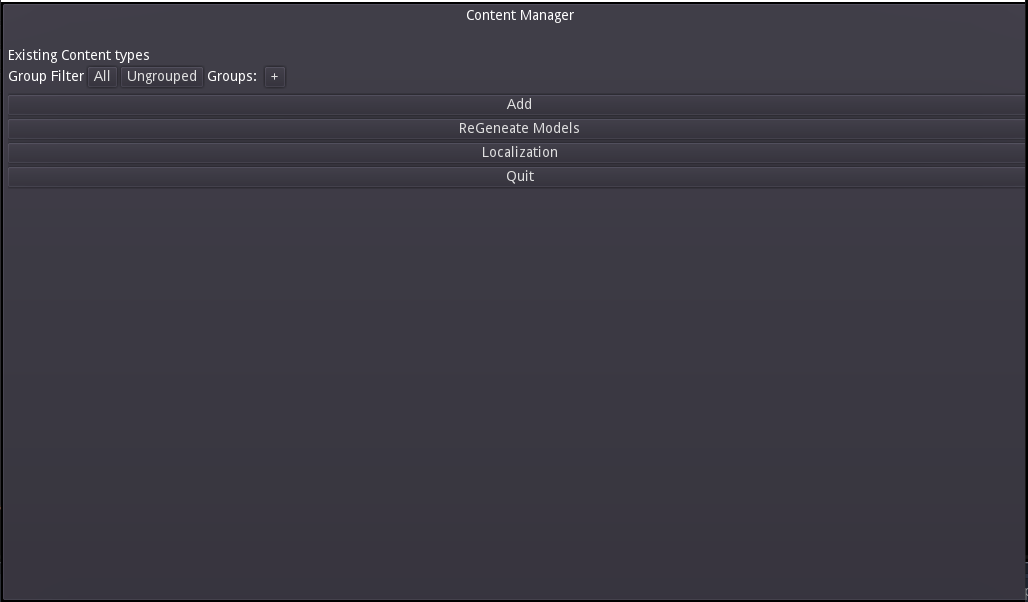
What is it?
The working names are Content Manager or Content Management System. Originally it was set to be an universal database for content items, but even now it does a lot of other useful things than storing data. Namingly:
- Object Relation Mapping
- generation of basic scripts, an alternative to LLM coding solutions that automates repetetive tasks without having to give up control
- generation of project structure (you usually don't want to spend time making these decisions, when you could spend it making the game, right?)
- named resource mapping (this would be better explained separately, but it's one of the things that can make the development easier)
Reasons behind CMS:
I came from Ruby on Rails background. The main appeal of the framework, among other things, is "convention over configuration" philosophy. You don't come up with project structure. It is generated for you and you just accept it - some trained programmers loathe that approach, because they know a slightly better way to organize the project (theoretically). But it comes with an enormous benefit. An Experienced RoR developer can instantly pick up on any project written in it, no matter how complex it is (as long as it adhers to conventions).
I was quite surprised no such framework exists for game development (for Godot specifically), so I decided to make one on my own to suit my needs. So far I'm deciding what to do with the tool, besides using it for my own hobby projects, but maybe its utility has grown to a stage I should share it with others.
Storage of data:
Many people in indie gamedevelopment prefer JSON for data storage. Because json is lightweight and effective. I considered that as well, but I decided to store data in separate .tres files for convenience.
If you want to use the data in your game from json, you have to map them to some sort of objects anyway. So why the extra step? By storing data in a Resource extending object, you can readily save and load it as a fully functional object with its own functions, signals etc.
You can also edit the individual .tres files in Editor. The UI is currently limited and even if it wasn't, you probably don't want to open it just to tweak a single value (This is another advantage over json approach - while the format is somewhat readable, it still doesn't stand a chance compared to individual files in terms of manageability).
Two types of data:
There are basically two types of data in CM: Singleton and Instanced. They behave differently in relations and the core AutoLoad node of the project, "Content", works differently with them.
Singleton resources are supposed to be all the same throughout the game. Typically this would encompass Damage types, Magic Schools or any other abstract categories you could think of. (You can use them for items, like weapons, as long as you don't mind the instances can't be modified separately) This means that when requested by name, ie. by syntax like Content.find("Weapon","Sword"), the method always returns the same resource reference.
If the individual instances are supposed to differ in their status (like ammo loaded in weapon, durability of armor, current hp of a monster), an Instanced model is used instead. Content.find("Weapon","Sword") will return a resource duplicate instead, so any changes to it will not affect other instances...
Content
As was mentioned, Content is a central autoload that stores and load your data. Notable functions are:
- find(content_type : String, item_name : String) - returns a single item by name (duplicates if Instanced).
- get_all(content_type : String) - return all items by type (duplicates if Instanced).
- generate(content_type : String) - returns a random item by type (a duplicate if Instanced).
This is by no way an exhaustive list, but these are the most common to use.
Models:
Resources are defined by their models. This is a terminology from MVC pattern. Model is supposed to encompass all the business logic of an object. When you define a new model (singleton or instanced) in CMS UI (the framework is supposed to spare you writing as much repetetive code as possible - especially for a solodev, switching mindset between programmer and designer can be tiring), two scripts are actually created. A Models/Meta file, which is not supposed to be overwritten by user - here, all the UI defined fields, relations etc. are stored. And a custom script in Models, that extends the metamodel, has a class name and you can put all your custom functions into it.
In Models/Definitions, there is a .tres file that stores the model configuration from which the meta-model is created. Can be modified directly, if for some reason, the UI falls short on it.
Field Types:
Currently implemented from common types are: String, int, float, Color
There are few fields that represent relations:
- Singleton Reference
This is basically a "belongs to" relationship towards a certain Singleton Type. Recently, I implemented a backward relation, so a MagicSchool object will have get_all_spells() function in its meta-model generated automatically when you define the Singleton Reference on Spell model. - Singleton Reference(Multi)
Basically an array of singleton references. Useful for tags. Backward relation is not implemented yet. In UI, this works as a list of checkboxes, so it might not be pretty for heavily populated Singletons. - Singleton Reference(Dictionary)
Very specific use case that can be powerful in many scenarios. Basically when you want to refer to all the singleton resources of certain type with value added. Armor has different int values against damage types, Researches have different progress status etc. You always define a Singleton type to act as key and then select the type and default value to be filled in (can be even subresource). - Subresource
Special form of instanced resource, that is supposed to be a data container inside another content type instance (can be typically shared between multiple types - like DamageVector resource - containing damage value and damage type, which can be shared by a Weapon, AttackSpell etc.). Some instanced resource types can be created as "subresource only", meaning that you can't actually create them in data management UI. - Subresource (Multi)
Not implemented yet. But you probably get the idea by now. - Named Resource
This field actually represents a constant path to another resource (texture, script, potentially sounds or even custom paths), which is filled in with content item type, name and name of variable referencing the them. So if you have a Fireball spell with an icon, the path to the icon will probably be "res://Game/Graphics/Spell/icon/Fireball.png". This can be very powerful, as the directories are generated automatically along with .txt todo list, so all you have to do is share the folder with your graphic dude (or look it up yourself when you feel like drawing).
Placeholder Content Generation
Do you want to populate your content type with placeholder content? No problem, there is feature for that. As long as you have some Singleton Reference fields on your model and have these referenced types already populated with some content, you may find this button in Data Management screen very useful: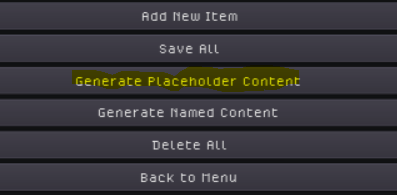
Typically, it will generate an item of content for every combination of references. For example, if there is a model named "Spell", that has references to "MagicSchool" (currently populated with "Fire" ad "Water") and "SpellType" (populated with "Attack" and "Utility"), it will produce following content: FireAttackSpell, FireUtilitySpell, WaterAttackSpell and WaterUtilitySpell, all with appropriate references.
You can configure this behavior, blacklist some references from the generation, add prefixes or disable using the content type name ("Spell" here). There is also a possibility to create multiple copies for each combination. This dialogue is in the model definition screen on the bottom right.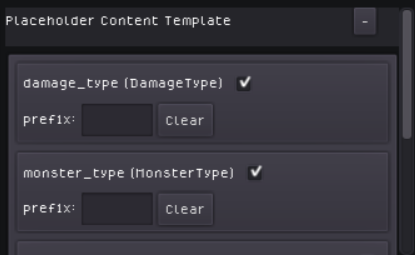
Context scenes generation
All the features above are about data creation, but you can't make games from data only. You need scenes to represent the data in the game. In the MVC, these scenes would be called "Views". I call them Context Scenes as it's better understood in Godot's terminology.
A single Context scene represents primarily one type of resource (let's leave secondaries to later). It is generated under appropriate folder in your project. For example, Scenes that represent "Item" will be stored in "res://Game/Scenes/Item".
To generate the Context, there is a form, currently sitting in on the bottom left of Model definition screen (until I find a better place for it) next to the placeholder content template.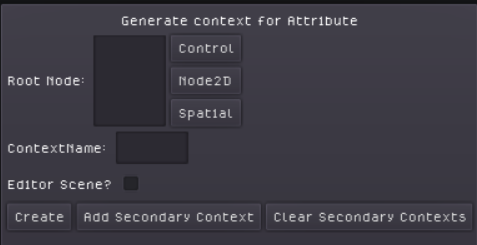
Root node is the root node of the scene to be generated. Context name will be the name of the scene. I recommend using generic terms like Display, or context based names like InWorld, InUI, OnCharacter denoting where the scene is supposed to be shown. Avoid using the Content type class in the name. It is already in the file's path as the name of the folder.
The generated scene will have the basic script generated that will look something like this:
The set_item() function connects the resource's change signal, so whenever it's emitted, function actualize() gets called. Here is where you set all values displayed in your scene. For example you can add a Sprite node and put $Sprite.texture = item.icon into the function and assigning the item to the scene will do all the magic.
Editors
If you check out the Editor scene? checkbox, the scene will be generated in the Editors folder instead. If you name the editor scene "Editor", it will replace the generic input in Data Management screen. Similarly, naming it "AddEditor" will append the scene to the generic input. This is useful for adding custom editors for features that don't have a functional input yet (like Singleton Reference(Dictionary)) or to custom fields you add into your custom model and aren't defined in the regular workflow.
Using Context Scenes
You can load the context scene as you would any other scene, add it to your tree and then set the content item for it. Let's say there is a context for Monster content type named InGame. The scene will be found in "res://Game/Scenes/Monster/InGame.tscn". Load it, instance it and set its monster variable to the monster you want to spawn. Alternatively, you can use the function "instance_as" that was generated on your model like this:
monster.instance_as("InGame") - this will return the instanced scene, that is already set with the desired content.
Planned Features
- Module Support: Enable creation and Usage of Modules that would behave similarly as the core project in "Game" folder. Solve registration of dependencies etc. Even CM itself could become a CM module (after some heavy refactoring), which would help me developing it further...
- User content: So far, all the content produced is saved in res:// directory, so it can only be used for content generation during development. I want to allow also for on the run produced content for savegames, configurations, achievements or other user custom generated content.
- Rework the framework to support Godot 4 syntax.
- Name the damn thing properly.
Download
Click download now to get access to the following files:
Leave a comment
Log in with itch.io to leave a comment.